Why matching Thai sounds to letters is hard — and how NidNoi helps
Romanization alone isn't enough. Here's what makes Thai tricky for beginners, and the sound-by-sound breakdown we added in vocabulary.
You look at a word like ขอบคุณ and the app says khop khun. Thank you — got it. But which part of the word is khop? Which letters make khun? For many beginners, that gap is where reading Thai stops feeling possible.
NidNoi 1.3 adds a sound-by-sound view on vocabulary words. Before we explain what the app does, it helps to see why this problem is genuinely difficult — it's not just you.
Thai doesn't separate words the way English does
English writes spaces between words. Thai often doesn't. ขอบคุณ is two spoken chunks (khop + khun) written as one unbroken string. Romanization shows the chunks with a space, but the Thai side gives you no hint where one chunk ends and the next begins.
Vowels don't sit where you expect
Some Thai vowels are written before the consonant even though you say them after. Others sit above, below, or around the consonant body. The shape on the page is a recipe for pronunciation, not a left-to-right spelling.
That means you can't reliably "read the Thai left to right" and hear the same order of sounds the romanization suggests. You have to learn the pattern for each vowel sign.
The same letter can sound different in different jobs
Consonants at the start of a syllable often sound different from consonants at the end. บ at the beginning of a word is like "b"; at the end of ขอบ it becomes a "p" sound (khop, not khob). ณ in คุณ ends as "n", not the full "no" you might expect from the letter name.
So even when you know the alphabet, mapping letter → sound inside a word takes extra rules — mid, high, and low class consonants, live vs dead syllables, tone marks. No wonder a single romanized line under the word feels opaque.
Why we don't auto-guess in the app
Software can romanize Thai automatically, but the results are often wrong for learners: wrong syllable splits, missing tones, odd spellings for clusters. Showing a bad mapping is worse than showing none — it teaches you the wrong mental model.
So NidNoi only shows alignments we wrote and checked by hand. Each chunk pairs a group of Thai letters with the part of the romanization it matches. No live guessing on your phone; what you see is what we mean.
What you'll see in the app
ขอบคุณ
khop khun
Thank you
ขอบ
khop
คุณ
khun
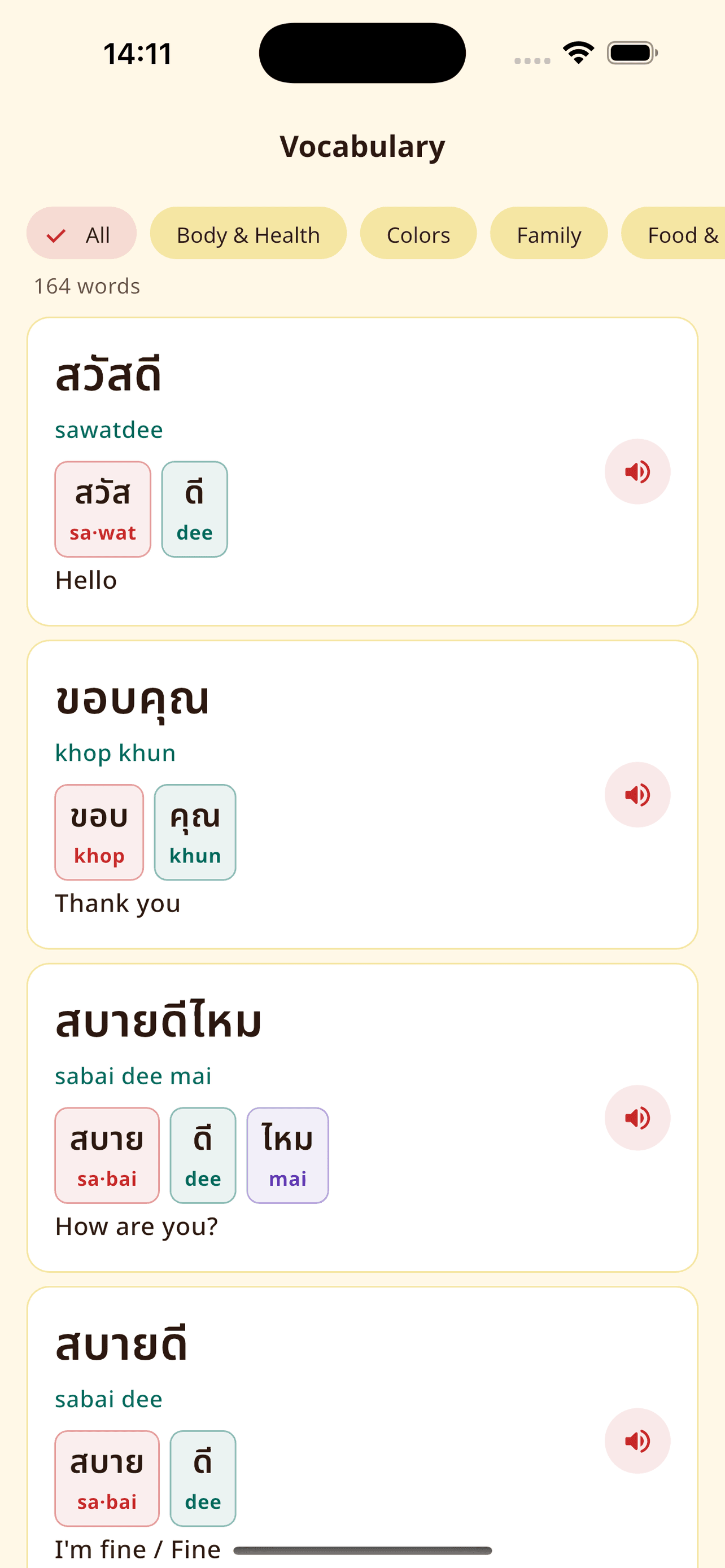
On the vocabulary screen, words with a breakdown show color-matched chips — Thai on top, romanization underneath. Open a word for a larger view and tap any chip to hear just that chunk. Tap the share icon to turn the word into a story card with the same layout.
We started with Greetings and will add more categories over time. If a word has no chips yet, you still see the full romanization — we only show a mapping when we're sure it's correct.
Where this fits in your learning
The alphabet tab teaches letters in isolation. Vocabulary is where letters meet real words. The breakdown bridge is meant for that moment — after you know ก and ข, but before you can read a menu without help.
Long term, the goal is still reading mode: Thai only, no romanization under every word. Until then, sound-by-sound mapping is a scaffold, not a crutch forever. Use it until the chunks feel familiar, then hide romanization when you're ready.
Try it in the app
NidNoi 1.3 is on the App Store — alphabet, vocabulary breakdowns, share cards, and more.